CHOOSE YOUR CONNECTION
USB simplicity or network flexibility?
Both paths take your Very Lit show from the Mac to real lights. ENTTEC DMX USB Pro is a straightforward choice for one DMX universe near your laptop. Art-Net is useful when you need multiple output universes or want the DMX node closer to the rig. Choose around your room, channel count and setup time.
Compare the two paths →Which fits your rig?
- One portable rig, within 512 channels, with an easy cable run from the laptop: start with ENTTEC DMX USB Pro.
- Several output universes, a node at the stage, or existing venue network lighting: consider Art-Net.
- Count DMX channel footprints, not just lights. A small number of fixtures with large pixel modes can fill a universe quickly.
| Decision | ENTTEC DMX USB Pro | Art-Net node |
|---|---|---|
| Setup | USB connection; no lighting-network IP setup. | Set a reachable node address and match output universe numbers. |
| Output capacity | One physical DMX universe: up to 512 channels. | Depends on the node’s ports and supported universe capacity. Each DMX output still carries one 512-channel universe. |
| Where hardware goes | USB interface stays near the Mac; run DMX from there. | Put the node near the lights; carry data over Ethernet from the Mac. |
| Equipment | USB data cable, Pro interface and DMX cable; connector adapters if needed. | Ethernet connection, Art-Net-to-DMX node, node power and DMX cable; a switch or Mac Ethernet adapter if needed. |
| Expansion in Very Lit | The current bridge uses one ENTTEC output. For more output universes, consider Art-Net. | The current bridge uses one configured Art-Net host. A compatible multiport node can receive different universe numbers at that host. |
| Common fault checks | USB data cable, device detection, another app using the interface, and universe Destination. | Network reachability, destination host, node port/universe mapping, and universe Destination. |
CHOICE 1
ENTTEC USB: the direct route for a compact rig
The advantages are a short setup checklist and a compact signal path. Connect the DMX USB Pro to the Mac, cable its DMX OUT to the rig, and route one show universe to Enttec in the bridge. No network addresses or switch configuration are needed for this output.
The DMX USB Pro provides one 512-channel output universe. ENTTEC specifies buffered DMX generation and isolated data and power lines. Those are hardware features; the software still needs to send the show to the interface.
The tradeoffs are the single output universe and keeping the USB interface close to the laptop. If the lights are across the room, plan a DMX run from that location. USB cable, hub or driver problems can still interrupt setup, and the interface should not be used by another lighting app at the same time.
Choose the exact DMX USB Pro model covered by our setup guide. ENTTEC Open DMX USB uses a different protocol; “USB to DMX” on a product listing does not establish compatibility with Very Lit.
USB path: one universe from the laptop
CHOICE 2
Art-Net: put the output where the lights are
Art-Net carries DMX data across an Ethernet network. For fixtures with DMX sockets, an Art-Net-to-DMX node converts that data into a physical DMX line. You still use ordinary DMX cable from the node to the fixtures.
The advantages are placement and expansion. You can put the node near the stage or dance-floor rig and run Ethernet from the Mac. A multiport node can provide separate DMX output universes, if its port capacity and configuration support your patch. Existing venue nodes may also make this the most convenient connection.
The tradeoffs are more equipment and more settings: node power, an Ethernet adapter or switch where needed, reachable IP addresses and the correct universe assigned to each output port. Allow time to test the network before the event. Wired Ethernet is the practical default for a show; a busy venue Wi-Fi network adds a dependency you need to evaluate.
The current Very Lit bridge sends to one configured Art-Net host. Do not assume it offers separate destination IPs for every node. For a straightforward multi-universe setup, check a multiport node that accepts the required universe numbers at that address.
Network path: DMX outputs nearer the rig
CHOICE 3
Compare the complete kit and the room
For a portable DJ booth with two washes and two movers, add up the channel widths. If the whole patch fits one universe and the DMX run is convenient, USB Pro is a sensible starting point. You can still group and animate those fixtures independently in Very Lit.
For fixtures split between a stage and a dance floor, think about where each DMX line starts. A node near the rig may simplify the cable plan. If you need separate output universes, check the node’s port count and the bridge’s available universe routes before purchasing.
Compare the complete setup cost rather than assuming one route is always cheaper. Include interfaces or nodes, adapters, power, switches and cables. A splitter creates branches of the same DMX universe; it does not add independent channel capacity.
Neither choice removes the need for compatible output hardware. Very Lit supplies the browser design and simulation, plus the Mac bridge for live output; your USB Pro or network node connects that output to physical fixtures.
CHOICE 4
Choose the output in Very Lit, then test one light
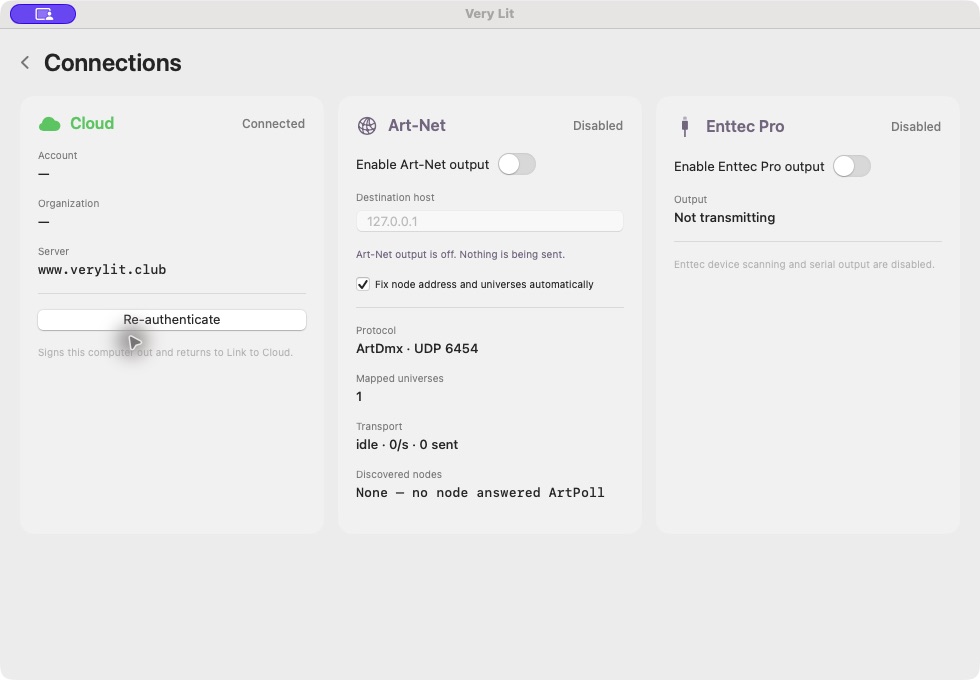
Create the same show and fixture patch whichever connection you choose. In the Mac bridge, open Connections and enable the output you are using. For USB, check the detected Enttec port. For Art-Net, check the destination host and network status.
Open each show universe and choose its Destination. Route only one universe to Enttec. For Art-Net, match the chosen Art-Net number to the node’s output-port configuration; node interfaces can label universe numbers differently.
Both routes support the same Very Lit design workflow, color themes and animation groups. The connection changes how the channel data reaches the rig. It does not make the same fixture’s colors or movement more expressive by itself.
Use our first-light test before running the full show. A changing channel grid confirms values are being produced; it does not prove that the interface, node or fixture has received them. Test one physical light, then extend the rig.
Questions before you buy
Does Art-Net need internet?
Art-Net sends lighting data on the local network; its packets do not need to travel through the internet. Account linking and loading a Very Lit show are separate from that local output path. Check the bridge guide for the complete show setup.
Can I use USB and Art-Net in the same show?
Yes. The bridge can enable both outputs and route different virtual universes to them. Keep one universe on the ENTTEC physical output and match each Art-Net route to the node’s configured universe. Both output routes still need their own working connections.
Does an Ethernet cable plug straight into a DMX socket?
No. Ethernet and DMX are different connections. Use an Art-Net-to-DMX node for a standard DMX fixture chain. A fixture with native Art-Net input is a different case; check its protocol, profile and network configuration before relying on it.
Is either route automatically more reliable?
Reliability depends on the hardware, cables and setup. USB removes IP and network routing checks from a small rig. Wired Art-Net can make a distributed rig easier to cable. Test the exact equipment and output mappings you will use at the event.
Design the show before choosing the connection.
Preview the Nightclub lighting in Very Lit, then connect the Mac bridge to the output hardware that fits your rig.
See Demo →See how the editor works → · Compare all lighting workflows →